

Vidoyo AI Review: The NeuralFilm Engine AI That Turns Prompts Into Studio-Quality Videos
Video creation used to be a production pipeline—actors, voice artists, editors, motion designers, coordination, reshoots, and days of waiting. If you wanted “real-looking” UGC-style ads or polished cinematic content, you paid for a team. Then the barrier went up again: AI video tools looked promising, but the results often felt fake.
That’s where Vidoyo AI comes in. It positions itself as a complete AI filmmaking studio powered by the NeuralFilm Engine—built to generate video that doesn’t trigger the uncanny-valley feeling. Instead, your audience should scroll past without thinking, “That looks like AI.”
In this Vidoyo AI review, I’ll break down how it works (from prompt to finished export), what you can create (UGC talking-head videos, cinematic shots, faceless content), and why its “content factory” approach may be the missing piece for anyone trying to scale video output.
What Is Vidoyo AI?
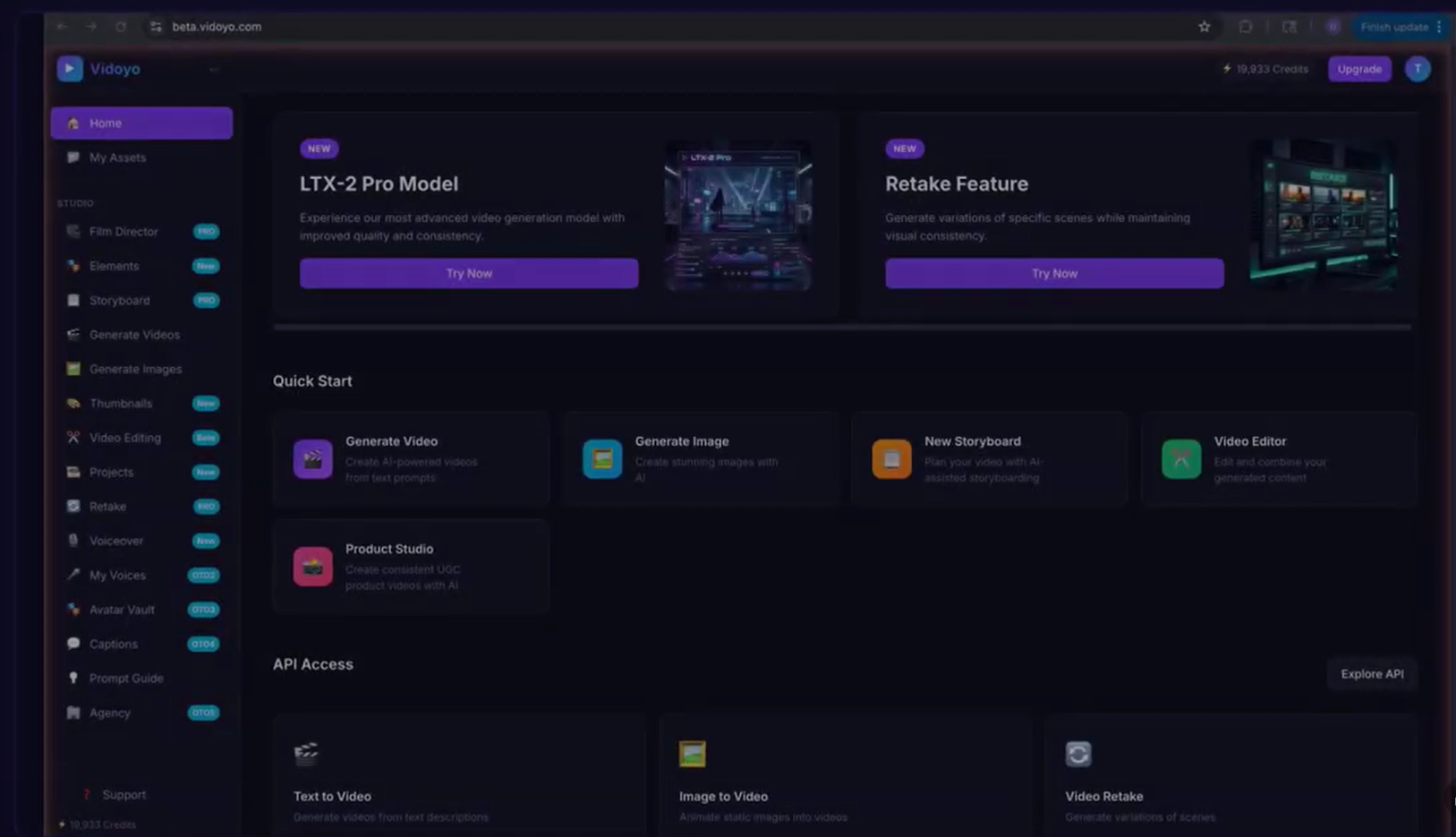
Vidoyo AI is an all-in-one AI filmmaking studio that lets you create studio-quality video content by typing a simple text prompt. It’s not just a “video wrapper.” The platform includes video generation, image creation, a multi-track editor, AI voiceover, storyboard-style prompting, thumbnail generation, and a consistency system designed to help your AI content look intentional instead of random.
According to the Vidoyo AI positioning, it’s built on a newer generation AI video model architecture (the NeuralFilm Engine). The claim is straightforward: the quality gap vs. older AI video tools is noticeable enough that the output can pass as professionally filmed footage—especially for UGC-style talking-head clips and cinematic product-style videos.
Vidoyo AI Demo Video (Watch Before You Decide)
Key Features of Vidoyo AI
Vidoyo’s feature set is built around one idea: faster production without sacrificing enough quality that your content performs. Below are the main capabilities you can use to generate and refine video content inside a single dashboard.
1) NeuralFilm Engine AI Video Generation
- Text-to-video workflow: describe what you want, choose a style, and generate.
- 4 video quality models: Fast, Pro, Draft, or Full quality (useful when you need speed vs. maximum fidelity).
- 14 cinematic camera movements: pan, dolly, orbit, jib, zoom, and more.
- 8 visual styles: realistic, cinematic, anime, 3D, cyberpunk, and additional looks.
- Up to 4K output: export with high resolution.
- Up to 20 seconds per clip: designed for short-form and ad creatives.
- Any aspect ratio: helpful for TikTok, Reels, Shorts, and ads that need specific framing.
2) AI Image Generation (Built In)
- Same prompt, same style: maintain consistency between video and visuals.
- Used for storyboards and supporting scenes: great when you want cohesion across a campaign.
3) UGC Creator-Style Talking-Head Videos
If your goal is ads or social content, Vidoyo’s UGC-style approach is central. The platform is designed to create “real person” looking talking-head clips—without hiring real people.
- Pick from AI personas: choose different faces from a large set of AI-generated characters.
- Assign an AI voice: includes 48 premium voices described as human-sounding.
- Change angle and framing: adjust camera position and style details to match what performs.
- Generate multiple variations quickly: ideal for testing hooks, styles, and presenters.
4) Video Editing Inside the Platform
One reason AI tools feel frustrating is the workflow—generate somewhere, edit somewhere else, then bounce between apps for thumbnails and audio. Vidoyo AI aims to keep everything in one place.
- Cut/arrange/polish timeline: uses a 4-track setup (2 video + 2 audio).
- Audio detach: pull audio off a clip so you can edit it separately.
- One editor for the full creation process: you can generate, add voiceover, add music, and export from the same dashboard.
5) AI Voiceover Studio
- 48 premium voices: use different tones and delivery styles.
- Emotion tags: add tone variation so your ads don’t sound flat.
- Drag-and-drop voice onto the timeline: designed for speed.
6) Thumbnail Generator
- Type a topic → get thumbnails: choose from multiple styles.
- Click-worthy formats: helps you publish faster without designing from scratch.
7) Magic Prompt (Prompt Enrichment)
Vidoyo AI uses a “Magic Prompt” approach to turn a simple idea into a richer cinematic prompt. In practice, that matters because many prompt-to-video tools require overly technical instructions. A prompt-enrichment helper can reduce the learning curve.
8) Consistency Tools (Stay on Brand)
- Elements system: save characters, objects, and places as reusable elements.
- Voice library: save and reuse custom voice configurations.
Benefits of Vidoyo AI (Why It’s Built to Convert)
Vidoyo’s strongest pitch isn’t just “AI video exists.” It’s that modern video monetization needs output volume—and older workflows don’t allow you to generate enough creative variations quickly.
Faster production = more creative testing
In ad ecosystems, creative freshness matters. If your competitors can test 10–20 variations in the time it takes you to film one, they’ll find the winners sooner. Vidoyo’s approach targets that advantage directly: generate, test, iterate, and move on.
UGC-style is the performance sweet spot
Vidoyo AI emphasizes that the videos that convert right now are often UGC-style talking-head clips: a real person look, direct-to-camera explanation, and product-relevant messaging. The platform is built to produce those clips without paying per shoot.
One dashboard reduces workflow friction
Even if you like AI generation, most creators still lose time moving between tools: video gen tool → editor → thumbnail tool → voiceover tool. Vidoyo AI keeps the workflow consolidated so you can go from idea to export faster.
Multiple monetization paths
Instead of forcing you into one business model, Vidoyo AI is presented as useful for affiliates, faceless channels, UGC services, and even brand agencies that want to deliver video as a product.
Benefits & Use Cases (Real Scenarios)
Scenario 1: TikTok Shop Affiliate—Test 10 Product Videos Per Day
Let’s say you found a product in TikTok Shop that has potential, but you don’t know which angle will convert. With Vidoyo, you can create short review/demo clips and test different hooks, camera styles, and AI presenters quickly.
Instead of filming yourself once and hoping it works, you can generate multiple versions, post more quickly, and iterate based on performance signals. This is the “video testing pipeline” idea Vidoyo AI leans into.
Scenario 2: Faceless YouTube—Build a Channel Without Being On Camera
If you want long-term compounding revenue, faceless YouTube can be a solid path. Vidoyo’s storyboard-style approach and built-in voiceover tools support a workflow where you write a script, generate scene content, add AI voice, edit, and export—without stepping in front of the camera.
Use it for tech reviews, history documentaries, top 10 lists, product comparisons, or explainers. Add thumbnails and publish faster than “script → record → edit” workflows.
Scenario 3: Social Media Affiliate—Validate an Idea in Minutes
Sometimes you don’t need a full production plan—you need a fast test. Vidoyo AI can help you generate an Instagram Reels-style promo, a YouTube Short, or a Pinterest video version so you can test quickly whether a concept gets traction.
If it works, you can generate additional variations. If it doesn’t, you haven’t wasted days. You used minutes to gather data.
Scenario 4: UGC Creator-for-Hire—Sell Videos for $200–$500 Each
Brands pay for UGC because it looks authentic and tends to perform better than polished corporate ads. The bottleneck is human cost: sourcing a spokesperson, recording voice, coordinating reshoots, and editing.
Vidoyo AI frames itself as an “output engine” for UGC services—letting you create multiple talking-head videos per day from scripts you receive from clients. If you can deliver quality fast, you can scale into higher order volume without hiring a full production crew.
Pros and Cons of Vidoyo AI
- Strong studio-style workflow: generate video, add voiceover, edit, create thumbnails, and export—without jumping between tools.
- Designed for UGC-style content: talking-head videos with AI faces and premium voices can reduce production cost dramatically.
- Multiple creative variables quickly: styles, camera movements, faces, angles, and voices support ad testing and iteration.
- Built to increase output volume: useful for affiliates, social content creators, and agencies who need many variations.
- Consistency tools: elements system and voice library support brand continuity across videos.
- Quality-first positioning: the NeuralFilm Engine is marketed as a major improvement over older AI video models.
- Short-form friendly: up to ~20 seconds per clip aligns well with ads and vertical content.
- Learning still matters: getting the best results may require prompt iteration and creative direction.
- Not a full replacement for complex productions: if you need complex live-action elements or heavy on-location work, AI output may not fully substitute.
Vidoyo: Who It’s For (and Who Should Skip It)
Vidoyo AI is a great fit if you are…
- Running paid ads and need frequent creative variations
- Building TikTok affiliate and want to test products daily
- Want to launch faceless YouTube content without being on camera
- Offering UGC video services and need to fulfill orders faster
- An agency that wants to deliver “video production” as a scalable offer
Consider looking elsewhere if you are…
- Only making one or two videos per month and don’t need output volume
- Require highly specific brand assets or environments that can’t be reliably represented via prompts
- Unwilling to iterate on prompts/styles to match your niche
Comparison: Vidoyo AI vs. Popular AI Alternatives
There are many AI tools marketed as “video generators,” but the difference usually comes down to workflow, quality consistency, and how well the tool supports monetization workflows like ad testing. Below are some related tools for context—each with a different angle. (Always evaluate based on your use case and workflow needs.)
Alternatives to consider
- Super Video Suite 2.0 — focused on promo video creation for conversions.
- Tube Engine AI — emphasizes hands-free YouTube channel automation.
- Monetivid AI — targets faceless video automation and monetization.
- Clipsfield AI — geared toward content creation with cinematic viral video results.
- Cinefx AI — oriented toward cinematic VFX-style generation.
Where Vidoyo AI aims to stand out is the combined studio workflow (generation + editor + voiceover + thumbnails) and the claim that the underlying NeuralFilm Engine model produces output that looks less “AI-like,” especially for UGC-style use cases.
How Vidoyo AI Works (Step-by-Step)
If you prefer a clear workflow, here’s the basic process Vidoyo AI is designed around.
Step 1: Type what you want (simple prompt)
You describe the scene or idea. Vidoyo’s Magic Prompt feature is built to enrich your request so the final output is cinematic rather than generic.
Step 2: Choose a style + model quality
Select a visual style (realistic/cinematic/anime/3D/cyberpunk, etc.) and pick the quality model: Fast, Pro, Draft, or Full depending on speed vs. fidelity.
Step 3: Generate variations
For ad testing, you typically generate multiple versions to compare different hooks, faces, angles, or camera movements. This is where “content factory” thinking matters.
Step 4: Edit in the timeline
Cut and arrange clips on the timeline. Detach audio if needed. Add or adjust voiceover and music.
Step 5: Add voiceover and music
Pick from 48 premium voices (with emotion tags) and add royalty-free music tracks. Preview and refine until the delivery feels right.
Step 6: Generate thumbnails and export
Create thumbnails in multiple styles and export the final video at up to 4K. Then publish.
My Honest Take: Is Vidoyo AI Worth It?
Vidoyo’s positioning is clear: it’s meant to eliminate the cost and time bottlenecks of video production by replacing the full studio pipeline with a prompt-driven interface. For anyone who is already monetizing with short-form video ads, TikTok Shop affiliate testing, or faceless channels, that kind of leverage can be meaningful.
The most compelling element is the combination of (1) UGC talking-head generation, (2) a built-in editor and voiceover studio, and (3) quick variation testing. If the output quality is truly in the “doesn’t look like AI” range for your niche, the time-to-publish advantage could translate directly into more experiments, more winners, and faster scaling.
However, like any AI content tool, you should expect to iterate. Prompt quality, style selection, and “creative direction” still matter. Vidoyo AI doesn’t remove creativity—it compresses the production steps that used to slow you down.
Who Should Buy Vidoyo AI First?
If you’re on the fence, consider buying if you match at least one of these profiles:
- You publish frequently: daily or near-daily short-form content needs speed.
- You run ads: creative fatigue means you must keep testing.
- You want to scale a service: delivering UGC videos profitably requires output volume.
- You want to build a faceless channel: you need a repeatable workflow for script → visuals → voice → edit → publish.
If you only need a single video occasionally, you may not extract enough value from a studio-style platform.
Conclusion / Final Opinion
Vidoyo AI is built for the new reality of video marketing: your edge isn’t just having a good idea—it’s moving faster than the rest of your market. By turning prompts into studio-style output and bundling generation, editing, voiceover, and thumbnails in one workflow, Vidoyo aims to help you produce enough variations to find winners.
If you’re creating UGC-style ads, building faceless channels, or selling video services, the “content factory” promise is the reason this tool may matter. When the bottleneck is speed and volume, eliminating production friction can be worth more than incremental improvements to quality.
Ready to test more hooks, faces, and angles without waiting on a production team? Get access to Vidoyo AI now and start generating studio-quality videos in seconds.
References (Related Reads)
If you’re comparing video automation tools or looking for additional AI marketing workflows, these reviews may be relevant for context: