

Facebook Messenger can be one of the fastest ways to generate leads—but if your team isn’t replying instantly, those conversations stall and the prospect moves on. Synthetic Ai is built specifically for this problem: your messages are already coming in, but they aren’t turning into closed customers because no one is following up quickly enough.
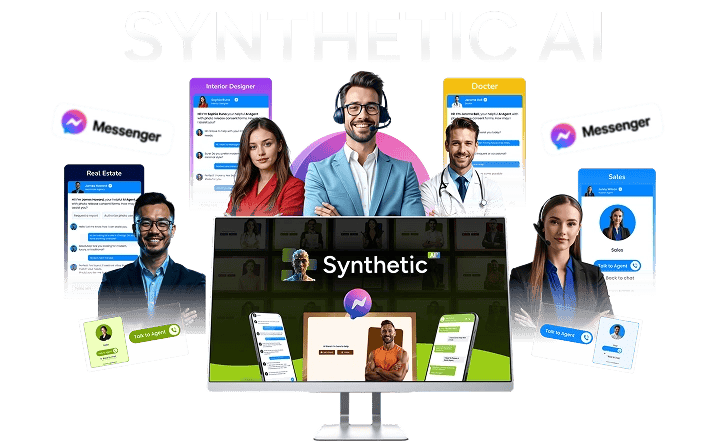
Synthetic Ai helps you deploy human-like AI agents that talk like you, reply instantly, and convert conversations into paying customers 24/7 across Facebook Messenger, websites, and shareable chat links. The goal is simple: turn messages into money with automation that feels real (not robotic).
In this review, I’ll break down what Synthetic Ai does, how it works in real-world scenarios, the key features that matter for sales and support, and who it’s best for. You’ll also get pros/cons and comparison alternatives so you can decide if it’s the right “AI closer” for your business.
What Is Synthetic Ai?
Synthetic Ai is an AI agent builder and deployment platform that lets you create conversational AI for sales, support, and lead qualification—without coding or hiring. Instead of using a basic chatbot that only provides scripted responses, Synthetic Ai focuses on “real conversation” behavior: engaging, guiding, and converting like a human closer.
It’s designed for businesses that receive inbound messages but lose opportunities due to slow response times, inconsistent follow-ups, or limited manpower. With Synthetic Ai, you can launch a trained agent that represents your brand, captures leads through built-in CRM features, and handles chats continuously—while still allowing live chat handoff when needed.
How Synthetic Ai Works (3 Easy Steps)
One of the biggest advantages of Synthetic Ai is its simplicity. The platform is presented as a “create once, run forever” solution. Here’s the workflow you can expect:
Step 1: Create your AI agent
- Enter a prompt for how you want the agent to behave.
- Paste your website URL and/or upload your content so the AI has your knowledge.
- Generate a human-like agent trained to talk, reply, and represent your business.
Step 2: Train and customize it to sound like you
- Set your tone, voice, and conversational style.
- Connect Facebook Messenger, website chat, or shareable chat links.
- Fine-tune behavior so the agent responds like you (and not like a generic bot).
Step 3: Launch, chat, and convert
- Deploy the agent to Facebook Messenger, your website, or a direct link.
- The AI replies instantly, engages leads, and captures information.
- Your built-in CRM tracks conversations so follow-up is organized and no lead is missed.
Key Features of Synthetic Ai
Not all AI tools are created equal. Below are the features that stand out for anyone evaluating an AI system for sales and customer support—not just content generation.
1) Facebook Messenger selling machine
Synthetic Ai is designed to connect directly to Facebook Messenger so your AI can reply where customers already are. That matters because Messenger conversations often move quickly. If you respond late, the lead loses trust.
- Instant replies to incoming messages
- Engages prospects with human-like conversation
- Moves users toward buying decisions
2) “One AI runs it all” across multiple channels
Instead of managing separate tools for different platforms, Synthetic Ai positions itself as a multi-channel agent. You can run one system across:
- Facebook Messenger
- Websites
- Smart chat links
3) Synthetic Ai brain: smart responses (not just generated text)
Generative AI can sound convincing while still failing to convert. Synthetic Ai is described as going beyond basic replies—understanding intent, responding naturally, and guiding users toward action.
- Intent-aware conversation flow
- Natural language responses
- Conversion-focused guidance
4) Built-in smart CRM for lead capture and tracking
One reason leads fall through the cracks is that teams don’t track conversations consistently. Synthetic Ai includes CRM functionality designed to capture, track, and manage every lead and follow-up automatically.
- Capture leads from chat conversations
- Track engagement and follow-ups
- Centralize conversation data in one system
5) Human-like personality (training your tone and style)
Synthetic Ai emphasizes “train it to be you.” You can set the agent’s tone, voice, and behavior so responses match your brand personality. That can reduce the “cold bot” feeling that customers often experience with chat automation.
- Match your tone and communication style
- Maintain consistent branding during chats
- Provide more trustworthy engagement
6) 1500+ realistic AI voices + voice cloning
If you use voice in your customer experience or want a more lifelike assistant, this feature may be a major selling point. Synthetic Ai includes premium voices and voice cloning options so the agent can sound more personal.
- Choose from 1500+ realistic voice options
- Use voice cloning to match your sound
- Build trust with a more “real” presence
7) Live chat + AI automation (automation with a human safety net)
Some businesses don’t want full automation for every case. Synthetic Ai includes a “live chat + AI automation” approach, allowing your AI to handle conversations 24/7 while you can jump in live anytime.
- AI handles the majority of conversations automatically
- Live handoff when you want to close personally
- Perfect for support and high-intent questions
8) Multi-role “super agents” (sales, support, onboarding)
Instead of building separate systems for different tasks, Synthetic Ai supports multi-role agents. The idea is that one agent can handle:
- Sales and lead qualification
- Customer support and FAQs
- Onboarding guidance
9) Train with your content (URLs, PDFs, knowledge uploads)
Synthetic Ai can be trained with your knowledge base. By uploading URLs and documents, the agent learns how to answer questions and represent your business accurately.
- Upload URLs and other content sources
- Use PDFs and knowledge assets
- Build expertise-based responses
10) Drag-and-drop customization (no technical skills)
Synthetic Ai is positioned as “no tech.” You can control responses, tone, flow, and behavior without needing to code or hire developers.
- Simple customization controls
- Adjust conversational logic and style
- Launch faster with less setup friction
11) QR code ready agents
If you run events, retail promotions, or offline campaigns, QR codes can be a direct path to instant chat. Synthetic Ai supports QR code deployment so people can scan and start talking immediately.
12) Track every lead and conversation
Capturing leads is one thing; tracking them is another. Synthetic Ai tracks engagement and conversions inside the built-in CRM so you can understand what’s working.
- Monitor conversations and outcomes
- Understand which messages convert
- Improve follow-up strategy over time
13) Works on all devices
Your AI assistant should work for mobile and desktop users. Synthetic Ai is designed to be accessible across devices so visitors get the same quality experience.
Benefits & Use Cases: Where Synthetic Ai Shines
Let’s talk about outcomes. The real question isn’t whether the AI can chat—it’s whether it can help you close. Synthetic Ai is positioned to do exactly that: reply fast, engage longer, and move leads toward purchase.
Benefit 1: Never miss a lead again
Most lead loss happens silently. A prospect messages you and expects an answer soon. If you’re busy, offline, or asleep, that lead may never return. Synthetic Ai is designed to respond instantly so the conversation doesn’t die.
Benefit 2: Higher conversion rates through 24/7 engagement
A lot of businesses only sell during business hours. Synthetic Ai keeps engaging outside those windows. That means more opportunities to convert, especially if your audience messages at night or weekends.
Benefit 3: Consistent brand voice and trust building
Customers trust businesses that communicate clearly. With “train it to be you,” Synthetic Ai aims to preserve your tone and style. When your AI sounds like your brand (and not a generic assistant), users are more likely to keep chatting.
Benefit 4: Turn chats into structured lead data
Even if the AI answers questions, you still need a way to capture information. Synthetic Ai’s built-in CRM is designed to automatically capture leads and organize follow-up, so you can run your sales pipeline with less manual work.
Benefit 5: Multi-purpose automation (sales + support)
Many businesses waste time handling repetitive questions. Synthetic Ai can combine sales, support, and onboarding into one agent system—reducing ticket load and helping prospects progress faster.
Real user scenarios / examples
- Local service business: A homeowner messages for pricing after hours. Synthetic Ai replies instantly, asks qualifying questions, captures details in the CRM, and schedules the next step.
- E-commerce brand: A shopper asks product availability and shipping. The AI answers, recommends options, and guides them toward a purchase link—while logging the lead.
- Coaching offer: A prospect asks whether your program is a fit. The AI follows your onboarding flow, shares key info, and moves them to the next action.
- Agency or service provider: Inbound messages arrive from ads. Synthetic Ai qualifies leads, captures notes, and alerts you for high-intent opportunities.
- Events and promotions: Attendees scan a QR code to start chatting instantly. Synthetic Ai explains offers, captures contact details, and keeps engagement moving.
Embedded Demo Video
Pros & Cons of Synthetic Ai
- Instant replies to Facebook Messenger leads: helps stop lead loss from slow response times.
- Human-like conversations: focuses on tone, voice, and engaging behavior rather than simple scripted answers.
- Built-in CRM for lead capture: tracks conversations and follow-ups so you can convert more systematically.
- Multi-channel deployment: one AI can run across Messenger, websites, and smart chat links.
- No coding required: designed for non-technical users to set up quickly.
- Multi-role capability: combine sales, support, and onboarding in one agent system.
- Voice options: includes 1500+ realistic voices and voice cloning to improve trust.
- Automation + live chat: you can keep control by stepping in when needed.
- Potential learning curve: while setup is described as simple, optimizing prompts and training content can take a bit of experimentation.
- Depends on your data quality: the more relevant your website/content training, the better the answers.
Synthetic Ai vs. Alternatives (Who Should Consider What?)
If you’re actively comparing “AI agent” products, it helps to look beyond marketing claims and decide which tool matches your primary goal: conversion automation, content generation, or business operations.
Below are a few alternatives that may fit different needs. They’re not direct replacements for “Messenger lead closing,” but they can be relevant depending on what you want to automate next.
1) Vidoyo-style AI tools (content/video generation) vs. Synthetic Ai (lead closing agents)
If your main goal is video creation from prompts, you may prefer a video-focused AI platform. Synthetic Ai, however, is built for conversational selling and CRM-based lead conversion.
2) ClientForce-style end-to-end automation vs. Synthetic Ai (chat-driven conversion)
Some tools focus on sales automation systems. Synthetic Ai is specifically targeted at customer chat and Messenger conversations—so if your funnel begins with inbound messages, Synthetic Ai may align better.
Read more: ClientForce AI review
3) Expert-focused platforms (training/education) vs. conversion agents
If you want to build teaching experiences or course-style outputs, platforms like AI teacher tools may make more sense. But for turning real conversations into real purchases, Synthetic Ai is purpose-built.
Read more: AI Professor review
4) AI business “systems” vs. chat-first conversion
Some tools position themselves as complete AI business systems. Synthetic Ai is more specialized: it centers on AI agents that reply, engage, and convert via chat. If you already have a funnel and need closing automation, that specialization can be a strength.
Read more: Secret Agency Profit Formula review
5) Video/promo automation vs. chat automation
If your primary bottleneck is ad creative and promo videos, a conversion video tool may be the better first investment. But if the leads are already messaging you and not buying, Synthetic Ai directly addresses that issue.
Read more: Super Video Suite review
Who Is Synthetic Ai For?
Synthetic Ai is best for businesses where inbound messages are frequent and time-to-response is a major factor in sales performance.
- Service businesses: consultants, agencies, local providers, and specialists who get leads via Messenger.
- E-commerce brands: product question volume, order help, and guided recommendations.
- Coaches and course creators: qualifying prospects and answering program questions fast.
- Small teams: anyone who can’t respond to every message instantly.
- Entrepreneurs looking for automation: want “create once, run forever” conversational support and selling.
Pricing, Commercial License, and Profit Potential
The product information indicates that a free commercial license is included. That matters if you plan to create AI agents for your own business or potentially offer them as a service to clients. The platform also highlights an “agency income ready” angle—creating and selling AI agents for clients while keeping profits.
Whether you use Synthetic Ai for your own brand or for client work, the profit potential typically comes down to three things: how many messages you receive, how quickly you respond now, and how well your agent is trained to qualify and convert.
Tips to Get the Best Results With Synthetic Ai
Even strong AI needs good inputs. If you want better conversion outcomes, focus on the training and the offer structure.
1) Use clear prompts tied to your offer
Instead of generic instructions, include what you want the agent to do at each step: greet, qualify, answer objections, and guide to purchase or consultation.
2) Train with your real sales pages
Upload your relevant URLs and materials (FAQs, pricing pages, onboarding docs, product descriptions). The agent performs best when it has accurate business knowledge.
3) Set a consistent conversational tone
Customers can tell when a bot feels “off.” Train your agent to sound like your brand and keep responses consistent across multiple message types.
4) Start with one high-intent use case
If your Messenger leads are struggling to convert, begin with sales qualification. Once you see results, expand into support and onboarding roles.
CTA: Get Access to Synthetic Ai Now
Final Conclusion: Is Synthetic Ai Worth It?
Synthetic Ai is built for one clear outcome: when leads message you, you should close them—instantly and consistently. Instead of relying on manual replies or limited business hours, Synthetic Ai uses human-like AI agents to engage prospects on Facebook Messenger and beyond, while capturing leads with built-in CRM tracking.
If your current bottleneck is response time, inconsistent follow-up, or the inability to handle every incoming question fast enough, Synthetic Ai directly addresses that with 24/7 conversational automation. And because it’s positioned as no-code and easy to train with your own content, it’s accessible even if you don’t have a technical team.
Ultimately, the best “AI closer” is the one that fits your workflow. If your customers are already reaching you via chat and you want to turn those messages into sales—without spending more time replying—Synthetic Ai is a compelling choice to test now.
Ready to power up your Messenger conversations? Click the button above to get access and start building your AI agent in minutes.